
If your computer is constantly running low on storage, you are not alone. Many users today work with large documents, videos, backups, and shared folders stored across cloud platforms, yet their PCs still end up full. The reason is simple: traditional sync tools often download cloud content to the local drive, which quickly consumes valuable disk space.
The good news is that there is a better way. Instead of syncing everything to your computer, you can work directly with cloud files while keeping them stored online. With Air Live Drive, you can mount cloud storage accounts as local drives and access your files from Windows Explorer without filling up your PC.
Why PCs Run Out of Space So Quickly
Running out of disk space is no longer just a problem for users with old computers. Even modern devices with fast SSDs can become crowded in a short time, especially when cloud storage is part of the daily workflow.
Several common situations cause this problem:
- Full synchronization of cloud folders to local storage.
- Duplicate copies of files across downloads, desktops, and synced folders.
- Large shared folders from work or team collaboration platforms.
- Media libraries, backups, and project files that continue to grow over time.
- Multiple cloud accounts storing business and personal data separately.
As storage fills up, the effects become noticeable. Your PC may slow down, software updates may fail, and it becomes harder to save new files or install applications. In business environments, low disk space can also affect productivity and make file access more difficult than it should be.

The Limits of Traditional Solutions
Most users try to solve storage issues in one of three ways: deleting files, moving them to external drives, or upgrading hardware. While these options may offer short-term relief, they do not fix the root problem.
Deleting files can be risky because important content may still be needed later. External hard drives add another layer of management and dependency. Upgrading to a larger SSD can help, but local storage will still fill up again if the workflow remains the same.
Selective sync is another partial solution. It lets users choose which folders stay on the computer, but it still forces them to constantly manage availability versus space. In practice, this can become inconvenient, especially for users who need access to many folders across several cloud services.
The real issue is not only how much data you have. It is the need to keep cloud files stored locally just to use them.
A Smarter Way: Access Cloud Files Without Syncing Everything
A more efficient approach is to access cloud storage directly from your desktop without downloading all files to your PC. This allows you to work with online content on demand while preserving local disk space.
When cloud storage is mounted as a local drive, you can:
- Browse folders from Windows Explorer.
- Open and manage files directly from the cloud.
- Avoid storing large amounts of synced data on your computer.
- Reduce file duplication.
- Simplify work across multiple cloud platforms.
This model is especially useful for users with limited SSD capacity, remote teams, and professionals who handle large files every day.
How Air Live Drive Helps Free Up Space on Your PC
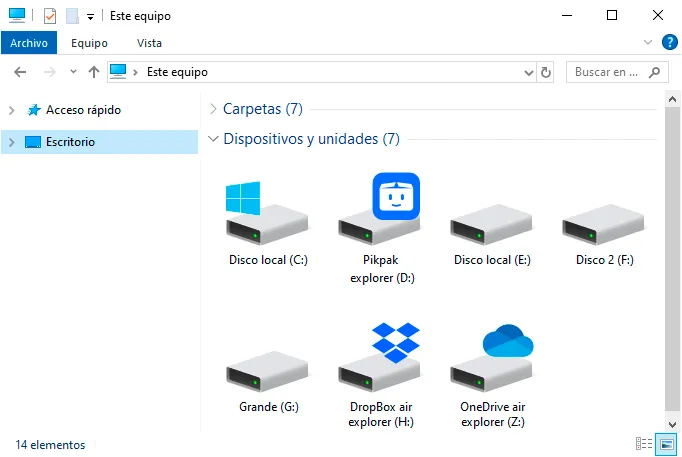
Air Live Drive is built for users who want direct access to cloud storage without the burden of full synchronization. The software mounts your cloud accounts as disk drives on your computer, so you can interact with online files as if they were stored locally.
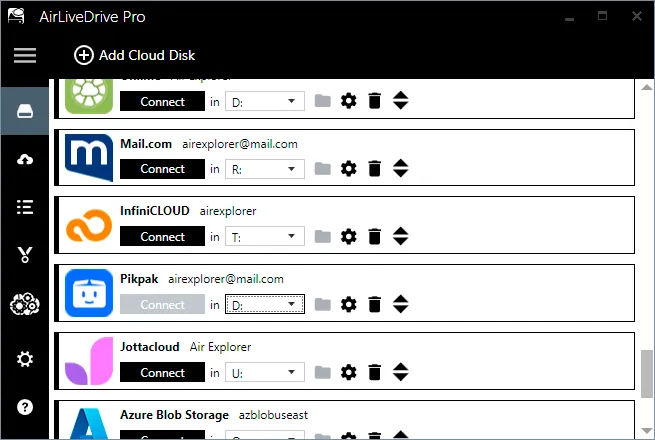
This means you do not need to keep complete cloud folders on your PC just to access them. Instead, your files remain in the cloud while still appearing in a familiar desktop environment.
With Air Live Drive, you can:
- Mount cloud storage as local drives in Windows.
- Access files directly from supported cloud providers.
- Reduce local disk usage.
- Manage multiple cloud accounts in one place.
- Work more comfortably from the desktop instead of switching between browser tabs.
For users who rely on cloud storage every day, this creates a more efficient and scalable workflow. The cloud becomes an active workspace, not just a remote archive.
Key Benefits of Working Directly with Cloud Files
Using Air Live Drive to work directly with cloud files brings both technical and practical advantages.
Save local disk space
Because files stay in the cloud instead of being fully synced, your PC keeps more free space available for applications, temporary processing, and essential local files.
Improve file organization
Mounting cloud accounts as drives makes it easier to navigate folders and manage content in a structured way without creating redundant local copies.
Simplify multi-cloud workflows
If you use more than one cloud provider, Air Live Drive helps centralize access through your desktop, reducing friction and saving time.
Keep a familiar user experience
You can work from Windows Explorer in a way that feels natural, without depending entirely on web interfaces
Who Can Benefit Most
Air Live Drive is especially useful for:
- Professionals with laptops or PCs that have limited SSD capacity.
- Creative users working with large media files.
- IT teams managing cloud-based file environments.
- Businesses using multiple cloud storage providers.
- Remote workers who need flexible access to online files.
If your daily work depends on cloud storage but your local drive keeps filling up, this solution offers a more practical alternative to traditional sync-based setups.
FAQ
How can I free up space on my PC without deleting files?
One effective option is to stop syncing all cloud files locally. Tools like Air Live Drive let you access cloud storage directly from your desktop, so files stay online instead of filling your hard drive.
Can I work with cloud files without downloading them first?
Yes. By mounting your cloud storage as a local drive, you can browse and manage files directly from your computer without performing a full sync.
What is the advantage of mounting cloud storage as a drive?
It gives you direct access to online files from Windows Explorer, reduces local disk usage, and makes cloud storage easier to manage in everyday workflows.
Is Air Live Drive useful for small SSD laptops?
Yes. It is especially helpful on devices with limited storage because it reduces the need to keep large cloud folders stored locally.
Conclusion
If you want to free up space on your PC, deleting files or buying more hardware is not always the smartest answer. In many cases, the better solution is to stop storing everything locally and start working directly with files in the cloud.
Air Live Drive makes this possible by mounting cloud storage as local drives, giving you convenient access to your files without consuming unnecessary disk space. For users looking to save storage, reduce clutter, and improve productivity, it is a practical and effective solution.