
If you’ve ever lost an important file, run out of phone storage, or scrambled to share a large folder with a friend, you already know why cloud storage matters. In 2026, cloud storage isn’t a luxury, it’s a necessity. But with so many services out there, how do you pick the right one? And once you do, how do you actually keep everything organized? Let’s break it all down.
What Is Cloud Storage and Why Should You Care?
Cloud storage is a service that lets you save files, photos, videos, and documents on remote servers accessed via the internet. Instead of storing everything on your hard drive or phone, your data lives online, safely backed up and accessible from any device, anywhere in the world.
For personal users, this means a few things:
- No more “storage full” nightmares on your phone or laptop
- Automatic backups so your memories and important files are never lost
- Easy sharing with friends and family without emailing large attachments
- Access from anywhere, your home PC, work laptop, or smartphone
- Peace of mind knowing your data is protected even if your device breaks
The global shift toward remote work, digital photography, and streaming content has made personal cloud storage more relevant than ever. Most people today use at least one cloud service without even realizing it.

The Best Cloud Storage Services for Personal Use in 2026
There’s no single “best” option, it depends on your needs, budget, and the devices you use. Here are the top contenders:
Google Drive
Google Drive remains one of the most popular choices, offering 15 GB of free storage shared across Gmail, Google Photos, and Drive itself. Its deep integration with Google Docs, Sheets, and Slides makes it ideal for users who work with documents regularly. Paid plans start at affordable rates with Google One subscriptions.
Microsoft OneDrive
If you’re a Windows user or already subscribed to Microsoft 365, OneDrive is a natural fit. It integrates seamlessly into File Explorer and offers 5 GB free, with generous storage included in Microsoft 365 plans. It’s particularly strong for backing up your desktop, documents, and photos automatically.
Dropbox
Dropbox pioneered personal cloud storage and still excels at what it does best: fast, reliable syncing across all your devices. While its free tier is limited (only 2 GB), its paid plans are robust, and its desktop app is widely considered the smoothest experience available.
Box
Box is a cloud storage service that strikes the perfect balance between personal convenience and professional-grade security. It offers 10 GB of free storage and stands out for its powerful sharing and collaboration features, making it great for users who frequently send files to others. Its clean interface and strong encryption make it a reliable everyday option.
MEGA
MEGA is a privacy-first cloud storage service headquartered in New Zealand, offering a generous 20 GB of free storage, one of the largest free tiers available. All files are end-to-end encrypted by default, meaning only you can access your data. It’s ideal for users who take their digital privacy seriously without wanting to pay a premium.
pCloud
pCloud is a privacy-focused alternative that stands out with its lifetime plan option, pay once, store forever. Based in Switzerland, it appeals to users who prioritize data security and GDPR compliance.
The Real Challenge: Managing Multiple Cloud Services
Here’s something nobody tells you when you start using cloud storage: most people end up with multiple accounts. You might use Google Drive for work documents, MEGA for private files, and Dropbox for shared projects. Before long, your files are scattered across platforms and finding anything becomes a headache.
This is where Air Explorer and Air Live Drive change the game entirely.
Air Explorer: All Your Clouds in One Place
Air Explorer is a desktop application that lets you connect and manage all your cloud storage services from a single interface. Think of it as a universal file manager for the cloud. You can browse, copy, move, and sync files between Google Drive, OneDrive, Dropbox, Box, MEGA, pCloud, and many more, all without switching between apps or browser tabs.
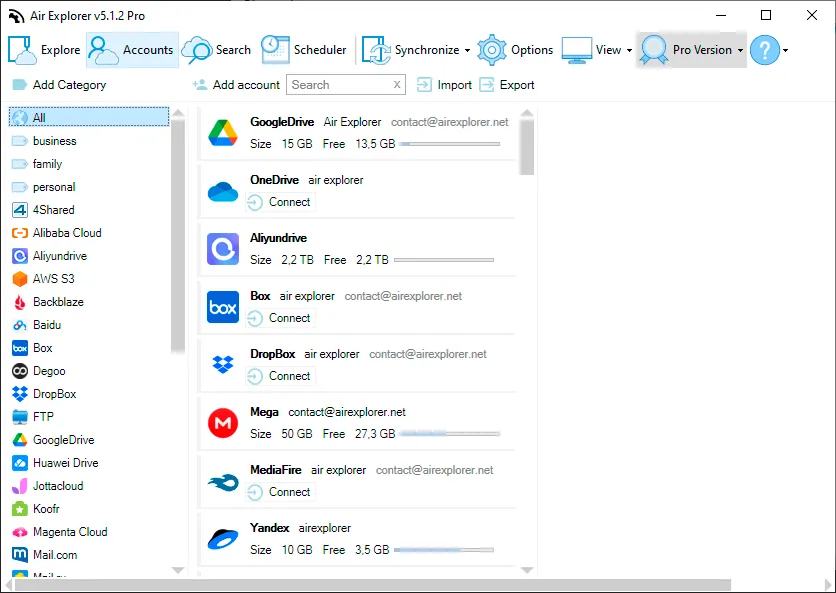
It’s especially powerful for transferring files between clouds. Need to move a folder from MEGA to OneDrive? Air Explorer does it directly, without downloading files to your computer first. This saves time, bandwidth, and frustration.
https://www.airexplorer.net/">Manage all your clouds with Air Explorer
Air Live Drive: Mount Your Cloud as a Local Drive
Air Live Drive takes a different approach. It mounts your cloud storage accounts as virtual drives directly in Windows Explorer. Your Google Drive, OneDrive, Box, or any other supported cloud appears as if it were a regular hard drive on your computer.
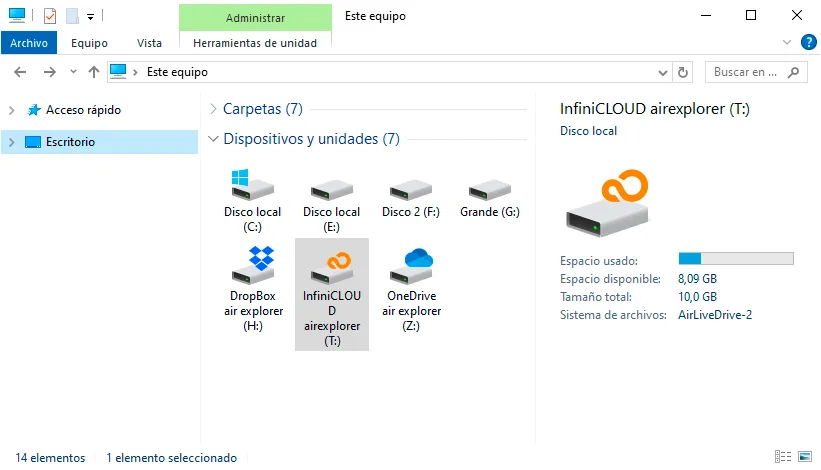
This means you can open, edit, and save cloud files using any application (your photo editor, video software, or word processor) without manually syncing or downloading anything. It’s the most seamless way to work with cloud files on a desktop.
Together, Air Explorer and Air Live Drive give you complete control over your cloud storage ecosystem. You stop wasting time hunting for files across different platforms and start actually using your storage the way it was meant to be used.
https://www.airlivedrive.com/">Air Live Drive: Mount your clouds as local drives instantly
Getting Started Today
The best cloud storage service is the one you’ll actually use consistently. Start with a free tier from Google Drive, MEGA, or Box, expand as your needs grow, and let Air Explorer and Air Live Drive keep everything tidy and accessible. Your future self, the one who can find any file in seconds, will thank you.