
Managing files in the cloud has become an essential part of modern digital workflows. Whether you’re a freelancer, a business, or simply someone who stores personal documents online, the way you organize your cloud folders directly affects your productivity. A messy structure leads to duplicated files, lost documents, and wasted time. A clean, well‑designed structure, on the other hand, makes your data easy to find, easy to maintain, and easy to protect.

In this article, we explore why a solid folder structure is crucial and how Air Live Drive helps you build and maintain the perfect organization system directly in your cloud accounts.
Why a good folder structure is essential in the cloud
Cloud storage offers flexibility, accessibility, and scalability, but without a clear structure, it can quickly become chaotic. A well‑organized folder system provides several benefits:
- Faster file retrieval: You know exactly where everything lives.
- Reduced duplication: A clear hierarchy prevents multiple versions of the same file.
- Better collaboration: Teams can navigate shared folders without confusion.
- Easier backups and migrations: Structured data is simpler to move or replicate.
- Improved long‑term governance: Clean organization prevents clutter from growing over time.
Without a defined structure, cloud storage becomes a digital junk drawer. The more files you add, the harder it becomes to manage.
Principles for designing the perfect folder structure

Creating a strong folder structure doesn’t have to be complicated. These principles help you build a system that is both scalable and easy to maintain:
- Keep it simple: Avoid overly complex hierarchies. A structure that is too deep becomes hard to navigate.
- Use clear, descriptive names: Folders like “Project_A_2025” or “Invoices_Clients” are far more useful than “Misc” or “New Folder”.
- Organize by workflow: Depending on your needs, you can structure by: Project, department, file type, client, year or quarter.
- Apply consistent naming conventions: Decide on a format, and stick to it.
- Use subfolders strategically: Subfolders help, but too many create confusion.
- Define rules for versioning and archiving: For example: “Archive_2024” or “Final_v1”, “Final_v2”
Challenges of organizing files directly in cloud services
Most cloud providers offer basic file management tools, but they come with limitations:
- Slow navigation through web interfaces
- Limited bulk actions
- Inconsistent features across providers
- Difficulty managing multiple clouds at once
- No unified view of all your cloud data

These limitations make it hard to build or maintain a clean folder structure, especially if you work with several cloud services.
How Air Live Drive helps you create the perfect cloud folder structure
Air Live Drive solves these challenges by letting you mount your cloud accounts as local drives on your computer. This transforms cloud organization into a fast, intuitive experience.
Mounting clouds as local drives
Air Live Drive connects your cloud accounts and displays them as regular drives in Windows Explorer.
This means you can:
- Navigate your cloud folders like local folders
- Use drag‑and‑drop to organize files
- Create, rename, or delete folders instantly
- Work with familiar tools instead of slow web interfaces
Managing multiple clouds in one place
You can mount Google Drive, OneDrive, Dropbox, Mega, Box, and many others simultaneously.
This allows you to:
- Build consistent folder structures across all clouds
- Move files between clouds easily
- Keep everything centralized in one interface
Bulk file operations made easy
Because your clouds behave like local drives, you can:
- Move large groups of files
- Reorganize entire folder trees
- Rename multiple items
- Clean up clutter quickly
This is especially useful when restructuring old or messy cloud accounts.
Maintaining consistency across clouds
If you use multiple cloud services, Air Live Drive helps you:
- Duplicate folder structures
- Keep naming conventions aligned
- Ensure every cloud follows the same organizational logic
Step‑by‑Step: Building a clean folder structure using Air Live Drive
1. Connect your cloud accounts
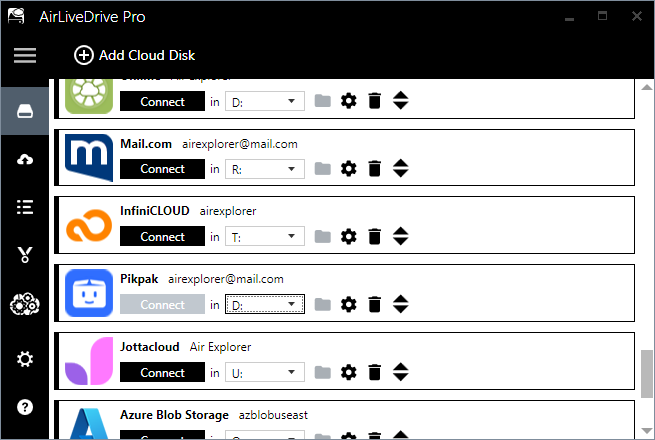
Open Air Live Drive and add the cloud services you want to organize.
2. Mount them as local drives in Windows Explorer
Each cloud will appear as a drive letter in Windows Explorer.
3. Create your top‑level folder hierarchy in each cloud
Start with broad categories such as:
- Clients
- Projects
- Finance
- Media
- Personal
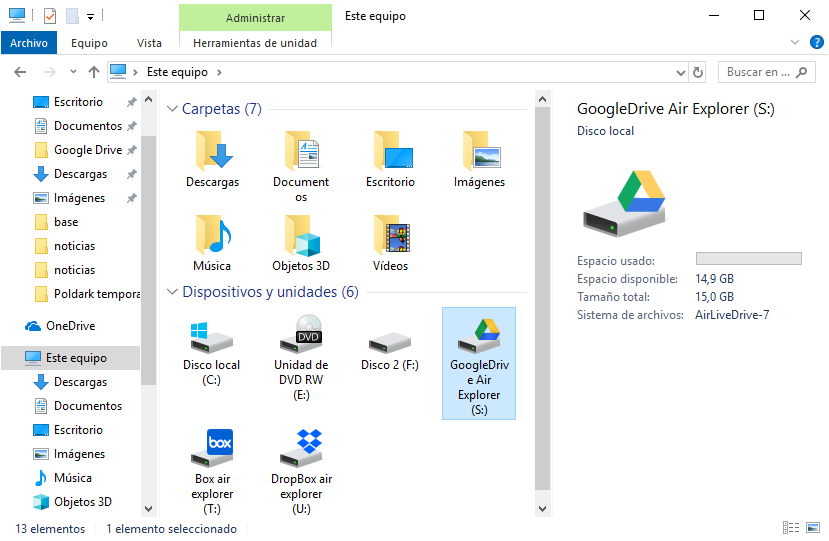
In Windows Explorer, you can see all your connected clouds and directly view the hierarchy you’ve created at a glance.
4. Add subfolders following your naming conventions
For example:
- Projects → 2025 → Project_Name
- Finance → Invoices → 2024
5. Move existing files into the new structure
Drag and drop files or use copy/paste to reorganize your cloud data.
6. Repeat the structure across clouds if needed
If you use multiple clouds, replicate the same hierarchy for consistency.
Best practices for long‑term cloud organization
A good structure is only effective if you maintain it. Here are some habits that help:
- Schedule periodic clean‑ups to remove outdated files.
- Use prefixes or tags like “2025_” or “Client_ABC” for clarity.
- Archive old projects instead of deleting them.
- Separate shared folders from personal ones.
- Document your structure so teams follow the same rules.
Use cases where Air Live Drive makes a big difference
Air Live Drive is especially useful for:
- Freelancers: Managing multiple client folders across different clouds.
- Teams: Keeping shared structures consistent across platforms.
- Users migrating data: Organizing files before or after a cloud‑to‑cloud or PC‑to‑cloud migration.
- Creatives: Handling large media libraries that require clear categorization.
- Businesses: Standardizing folder structures across departments and employees.
Conclusion
A well‑designed folder structure is the foundation of efficient cloud file management. It saves time, reduces errors, and keeps your data organized as your storage grows. With Air Live Drive, creating and maintaining that structure becomes effortless. By mounting your cloud accounts as local drives, you gain full control over your organization system, no more slow web interfaces or scattered files.
If you want a cleaner, more productive cloud environment, Air Live Drive is one of the most effective tools you can use.