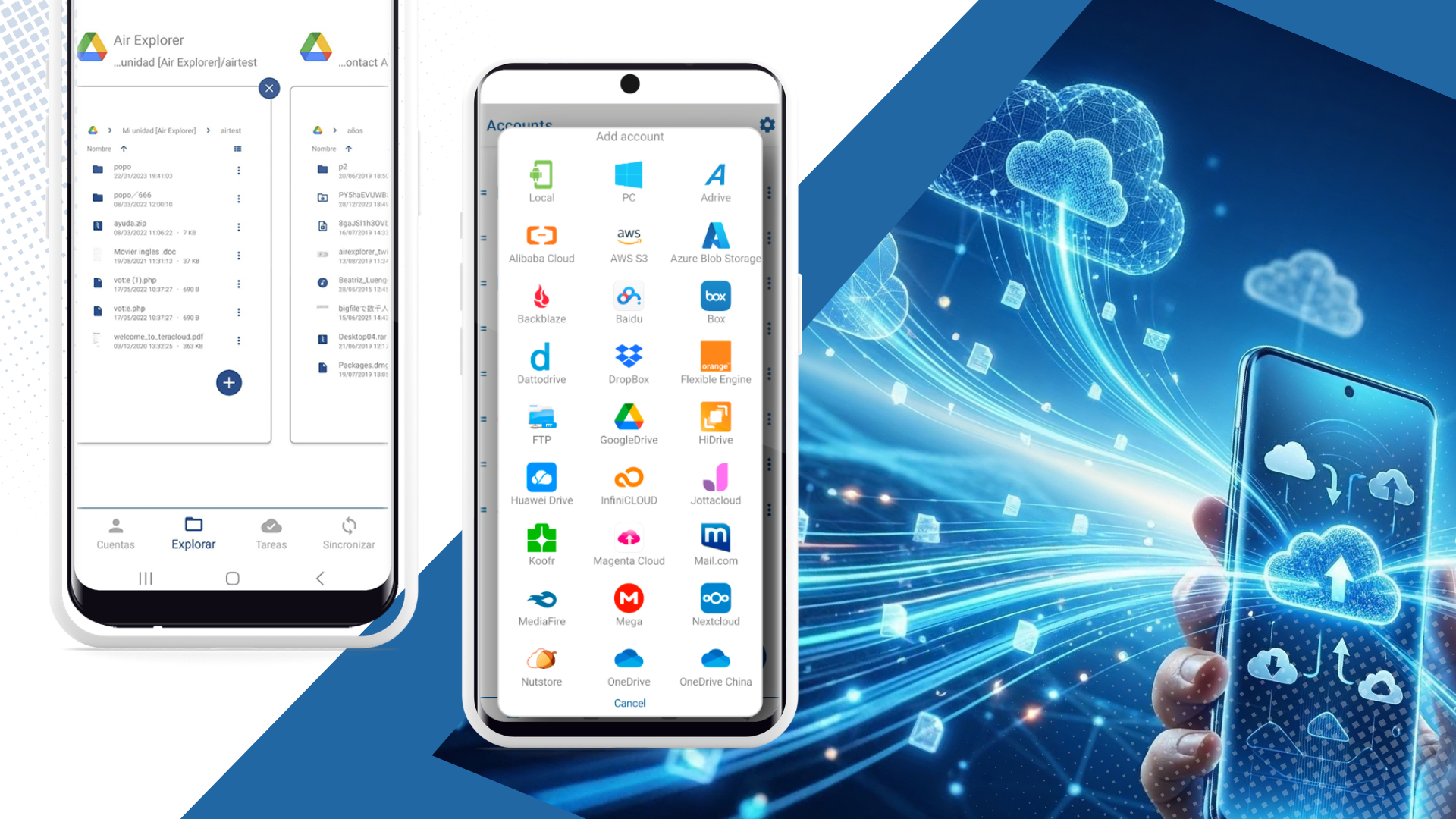
In the current B2B and freelance landscape, mobility isn’t just a feature, it’s a requirement. However, managing multiple cloud accounts on a smartphone is often a logistical challenge, typically involving switching between numerous apps, downloading files locally, and re-uploading them. This fragmented process consumes time, battery, and mobile data.
Air Explorer for Android changes the game, offering a professional-grade interface to manage your entire cloud ecosystem from a single, lightweight application designed for high-performance file handling.

The Problem with Traditional Mobile Cloud Management
Most users rely on official individual apps for Google Drive, Dropbox, or OneDrive. When you need to move a 500MB folder from a personal Drive to a professional S3 bucket or a Mega account, you are usually forced to:
- Download the file to your phone’s limited internal storage.
- Open the second application.
- Upload and wait for completion, risking data corruption if the connection drops.
Air Explorer for Android eliminates this friction. It allows for direct, intuitive management without using your phone’s local storage as an intermediary, effectively acting as a bridge between your digital assets.

Core Benefits: Why Choose Air Explorer for Your Mobile Workflow?
Air Explorer for Android is built specifically for advanced file manipulation and synchronization, providing features usually reserved for desktop environments.
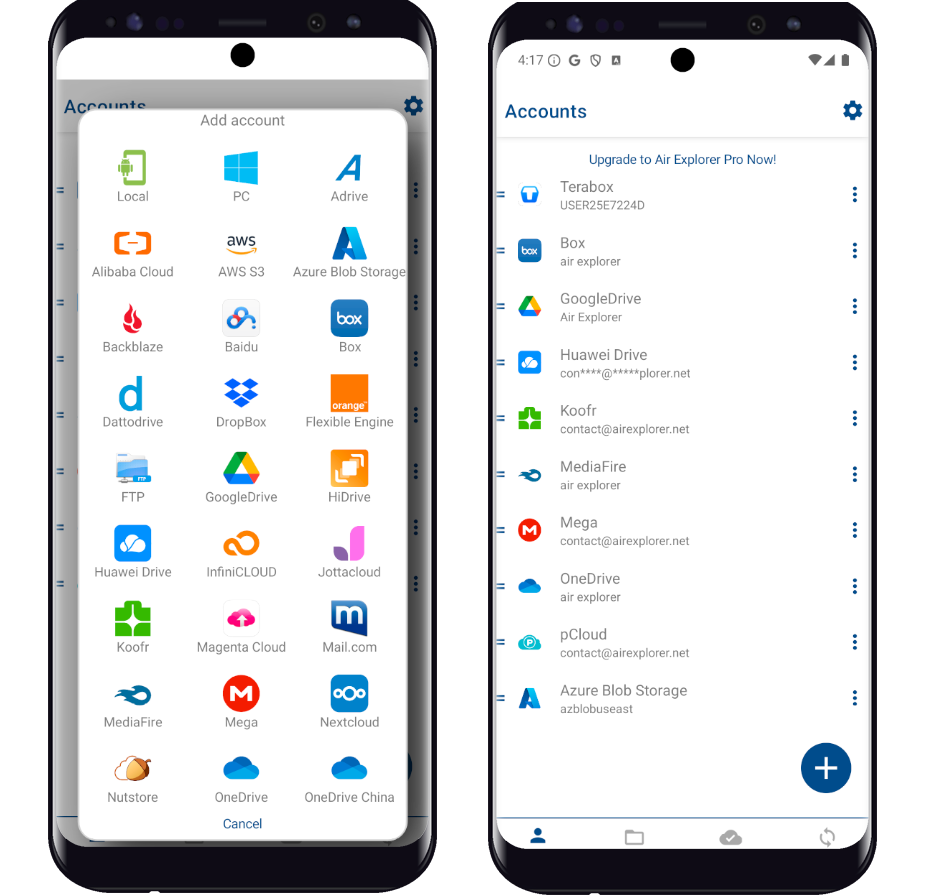
- Comprehensive Multi-Cloud Integration: Native support for Google Drive, OneDrive, TeraBox, Dropbox, Mega, Azure, Box, WebDAV, S3, and many more.
- Direct Cloud-to-Cloud Transfers: Copy and paste files between different providers as if they were local folders.
- Client-Side Encryption: Protect your sensitive data with custom passwords before it is uploaded to the cloud.
- Zero Intermediate Storage: Move gigabytes of data without ever filling up your device’s internal memory.
Step-by-Step: Moving Files Between Clouds in Seconds
1. Add Your Cloud Accounts
Open Air Explorer and tap the “+” icon. Select your provider and authenticate. The app uses official protocols to ensure your credentials remain secure and the connection is direct between your device and the cloud service.
2. Multi-Window Navigation
The interface is optimized for agile multitasking. Each cloud account opens in its own window or tab, allowing you to jump between different services with a single tap. This window-based system ensures you can keep multiple sources active and switch between them instantly to locate, organize, and prepare your transfers.
3. Transfer and Sync
Long-press the file or folder you need, select “Copy,” navigate to the target cloud, and hit “Paste.” For recurring tasks, the Sync feature ensures that both clouds remain updated with the latest versions of your documents automatically.
Efficiency Comparison: Air Explorer vs. Standard Mobile Methods
| Feature | Air Explorer for Android | Standard Individual Apps |
|---|---|---|
| Workflow | Unified (All clouds in one) | Fragmented (Switching apps) |
| Direct Transfer | Yes (Cloud to Cloud) | No (Download -> Upload) |
| Storage Usage | Zero (Direct stream) | High (Requires local space) |
| Encryption | Built-in Client-Side | Not usually available |
| Syncing | Advanced Automated Sync | Manual only |
Common Questions About Mobile Cloud Transfers
The most efficient method is using Air Explorer for Android. It connects multiple cloud accounts (Google Drive, Mega, OneDrive) in a single interface, allowing users to transfer files directly between them using a copy-paste system, bypassing the need to download files to the phone first.
Yes. By using Air Explorer for Android, you can log into both accounts on your mobile device and move folders instantly. This professional interface manages the transfer logic directly, saving time and mobile data compared to using individual cloud apps.
Security is a core pillar of Air Explorer. The app supports encrypted uploads, meaning your files are password-protected locally before reaching the cloud provider. Additionally, it uses official OAuth systems for logins, ensuring your passwords are never stored by the application.
Building a Professional Multi-Device Strategy
For power users, Air Explorer for Android and the desktop version are complementary tools designed for different scenarios. It is important to note that while both versions allow you to manage the same cloud data, they operate with independent configurations to maximize device efficiency:
- Independent Configurations: Synchronization tasks and settings are stored locally on each device. This means a sync task created on your Android phone will not appear on your desktop version, allowing you to tailor your workflows specifically for mobile or workstation environments.
- Shared Cloud Data: Since both apps connect directly to your cloud providers, any file modification, deletion, or upload performed in one version will be immediately visible in the other. Your data stays consistent across all platforms.
- Optimized Use Cases: Use the desktop version of Air Explorer or Air Cluster for heavy, automated backup routines and background tasks. Use the Android app for on-the-go file management, quick transfers, and immediate access to your global cloud assets.
This approach ensures that you have total control over your digital assets, with the flexibility of mobile access and the power of desktop automation.
Conclusion
Managing the cloud shouldn’t be a hurdle for mobile productivity. Air Explorer for Android provides the most cohesive, secure, and rapid experience for professionals who need to move data “in seconds.”
Ready to take control of your data? Download Air Explorer from the Google Play Store and transform your smartphone into a high-performance cloud management station.