
For small businesses, choosing the right cloud storage isn’t just about space, it’s about security, collaboration, and keeping costs under control. With so many options available, finding the right fit can feel overwhelming. In this guide, we break down the three best secure cloud storage options for small businesses and show you how to manage them all from a single interface using Air Explorer, available for both Windows and Mac.
What Should Small Businesses Look for in Cloud Storage?
Not all cloud services are built the same. Before committing to a provider, small businesses should evaluate five key factors:
- Security: end-to-end encryption, two-factor authentication, and granular access control
- Collaboration: easy file sharing, real-time editing, and team permissions
- Scalability: flexible plans that grow with your business without breaking the budget
- Reliability: guaranteed uptime, version history, and file recovery options
- Compatibility: works seamlessly across devices, operating systems, and existing tools
The 3 Best Secure Cloud Storage Options for Small Businesses

1. Google Drive
Google Drive is the go-to choice for small teams that rely on collaboration. It offers 15 GB of free storage and scalable paid plans through Google Workspace, starting at just a few euros per user per month.
- Seamless integration with Docs, Sheets, and Slides for real-time co-editing
- Robust sharing controls, audit logs, and admin management tools
- Trusted infrastructure backed by Google’s enterprise-grade security
Best for: teams already using Gmail or any Google Workspace tool.
2. Microsoft OneDrive
OneDrive is the natural choice for businesses operating within the Microsoft ecosystem. Bundled with Microsoft 365, it provides 1 TB of storage per user and integrates natively with Word, Excel, and Microsoft Teams.
- Advanced ransomware detection and file recovery built in
- Centralized management through the Microsoft 365 admin panel
- Available on Windows, Mac, iOS, and Android with a consistent experience
Best for: businesses using Windows PCs and Microsoft 365 productivity tools.
3. Dropbox
Dropbox has built its reputation on simplicity and reliable team file management. Business plans start at 2 TB of storage and include advanced sharing features, extended version history, and fine-grained access controls.
- Intuitive interface with virtually no learning curve
- Smart Sync lets users access all files without consuming local disk space
- Strong integrations with third-party apps like Slack, Zoom, and Canva
Best for: small teams that prioritize ease of use and dependable file sharing.
Cloud Storage Plans at a Glance
| Google Drive | OneDrive | Dropbox Business | |
|---|---|---|---|
| Free storage | 15 GB | 5 GB | 2 GB |
| Paid storage | From 100 GB | 1 TB/user | From 2 TB |
| Best for | Collaboration | Microsoft ecosystem | Team file sharing |
| Encryption | ✅ | ✅ | ✅ |
| Cross-platform | ✅ | ✅ | ✅ |
How to Add These Clouds to Air Explorer
Air Explorer lets you connect Google Drive, OneDrive, and Dropbox into a single unified interface, available for both Windows and Mac. No more switching between browser tabs, desktop apps, or separate logins, everything lives in one place.
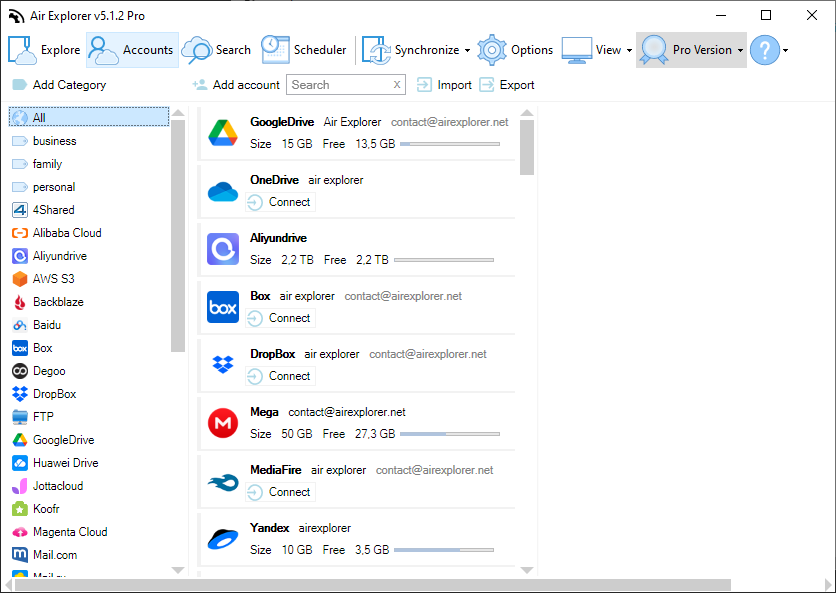
Follow these steps to get started:
- Download and install Air Explorer from the official website (Windows or macOS).
- Open Air Explorer and navigate to the Accounts panel.
- Click Add new account and select your cloud provider (Google Drive, OneDrive, or Dropbox).
- Sign in with your business credentials and grant Air Explorer the necessary access permissions.
- Repeat the process for each cloud service you want to connect.
- All your clouds now appear in a unified panel (browse, upload, download, and transfer files between them instantly).
💡 Pro tip: Assign a custom alias to each account (e.g., “Company OneDrive” or “Marketing Dropbox”) to stay organized when managing multiple accounts or services side by side.
Why Manage Your Business Clouds with Air Explorer?
Managing Google Drive, OneDrive, and Dropbox separately means juggling multiple apps, passwords, and interfaces every day. Air Explorer eliminates that friction by giving your team a single, secure command center for all your business data. Here is what small businesses gain:
- Time savings: transfer files directly between clouds without downloading and re-uploading, no wasted bandwidth, no duplicated effort.
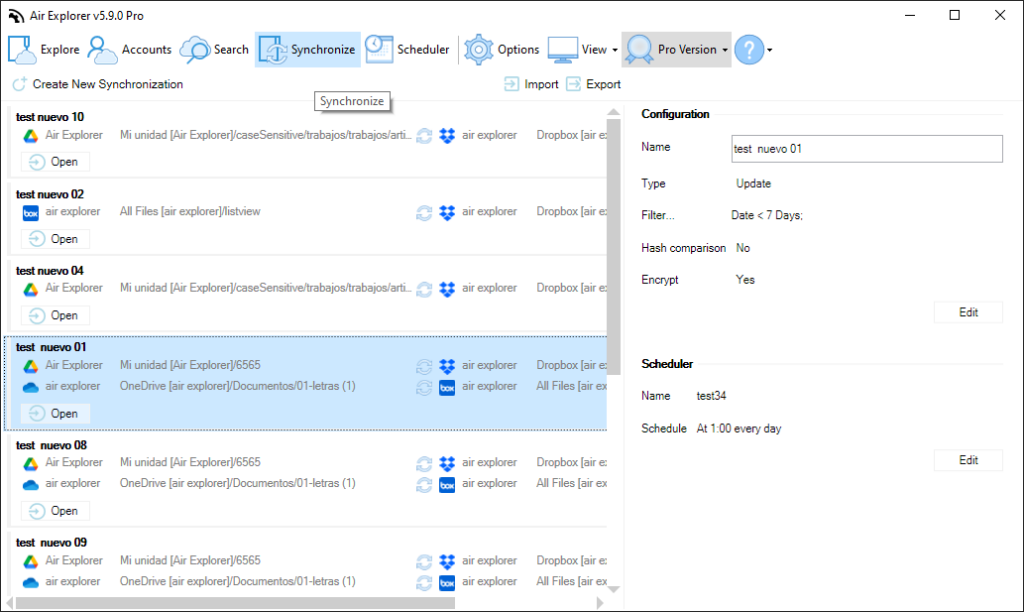
- Centralized synchronization: set up sync tasks between any two clouds or between a local folder and the cloud, using modes like Mirror, Bidirectional, Update, or Customized.
- Automated schedules: configure recurring sync jobs so your backups and file transfers run automatically, without manual intervention.
- Encrypted uploads: enable encryption before uploading sensitive business documents to any cloud provider, adding an extra layer of protection.
- Cross-platform access: the same clean experience on both Windows and Mac, making it ideal for mixed-device teams.
- Multi-account support: connect multiple accounts of the same service (for example, two separate Google Drive accounts) and manage them side by side in a single view.
Frequently Asked Questions
Can I use Air Explorer with Google Drive, OneDrive, and Dropbox at the same time?
Yes. Air Explorer supports all three services simultaneously, allowing you to browse, transfer, and synchronize between them from a single application.
Is Air Explorer available for Mac?
Yes, Air Explorer is fully available for both Windows and macOS, offering the same features on both platforms.
Do I need technical knowledge to set up Air Explorer for my business?
No. Air Explorer features a visual, step-by-step interface that guides you through connecting accounts, setting up sync tasks, and scheduling automated transfers, no technical expertise required.
Is it safe to manage business files with Air Explorer?
Yes. Air Explorer supports encrypted uploads, meaning your files can be protected with encryption before being sent to any cloud provider, keeping sensitive business data secure.
Start Managing Your Business Clouds Smarter
Google Drive, OneDrive, and Dropbox each bring real value to small businesses. The true advantage comes when you stop managing them in isolation. With Air Explorer, you get a single, secure, and intuitive hub for all your business clouds, saving time, reducing the risk of errors, and keeping your files exactly where you need them, every day.