
The digital landscape has undergone a radical transformation over the last decade. Not long ago, we were tethered to physical hardware, clunky external hard drives, fragile CDs, and USB sticks that were easily lost. Today, the “Cloud” has become our primary digital home. We store our memories, our professional projects, and our sensitive data on remote servers that we can access from the palm of our hands.
However, this convenience has birthed a new kind of chaos. As we sign up for various services to take advantage of free storage tiers, 15GB here, 5GB there, another 20GB elsewhere, we find ourselves in a fragmented digital ecosystem. We have transitioned from the struggle of physical storage to the struggle of digital management.

The core benefits of cloud storage
The adoption of cloud storage isn’t just a trend, it’s a fundamental shift in how we handle information. The benefits are clear:
- Accessibility & mobility: The primary advantage is the “access anywhere” factor. Whether you are at a coffee shop in London or an office in Tokyo, your files are exactly where you left them. This mobility is the backbone of the modern remote-work culture.
- Data redundancy and safety: Physical hardware fails. Hard drives crash, and laptops get stolen. Cloud providers invest billions in data redundancy, meaning your file is usually mirrored across multiple physical locations. If one server fails, your data remains safe.
- Scalability and cost-efficiency: For both individuals and businesses, the cloud offers a pay-as-you-go model. You no longer need to buy a 10TB server upfront. You can start small and scale your storage as your needs grow, saving significant capital expenditure.
- Seamless collaboration: The cloud has killed the “v2_final_final.doc” email chain. Real-time collaboration allows multiple users to work on the same document simultaneously, increasing productivity and ensuring everyone is on the same page.
The hidden challenges (The “Pain Points”)
Despite the advantages, relying on the cloud presents several friction points that can hinder productivity:

- Storage fragmentation: This is the most common issue. A user might have photos on Google Drive, work documents on OneDrive, and backups on MEGA. Finding a specific file becomes a digital scavenger hunt, wasting time and mental energy.
- Local disk congestion: Most official cloud apps work by “mirroring” or “syncing” folders. This means that if you have 100GB in the cloud, the app tries to download those 100GB to your computer’s SSD. For users with limited local storage, this creates a constant battle for disk space.
- Management fatigue: Logging into multiple web interfaces is tedious. Each provider has a different layout, different sharing settings, and different upload limits. Switching between tabs to move a file from one service to another is an inefficient, manual process.
- Bandwidth and sync issues: Official clients can be resource-heavy, slowing down your computer during intense sync operations or failing to update files correctly when connection drops occur.
Solving challenges
We realized that the problem isn’t the cloud itself, but how we interact with it. We have developed a specialized ecosystem to solve every specific pain point mentioned above.
1. Air Explorer: The ultimate manager
Air Explorer is designed for the power user who needs total control. It replaces the messy web interfaces with a clean, professional “Dual-pane” desktop application.
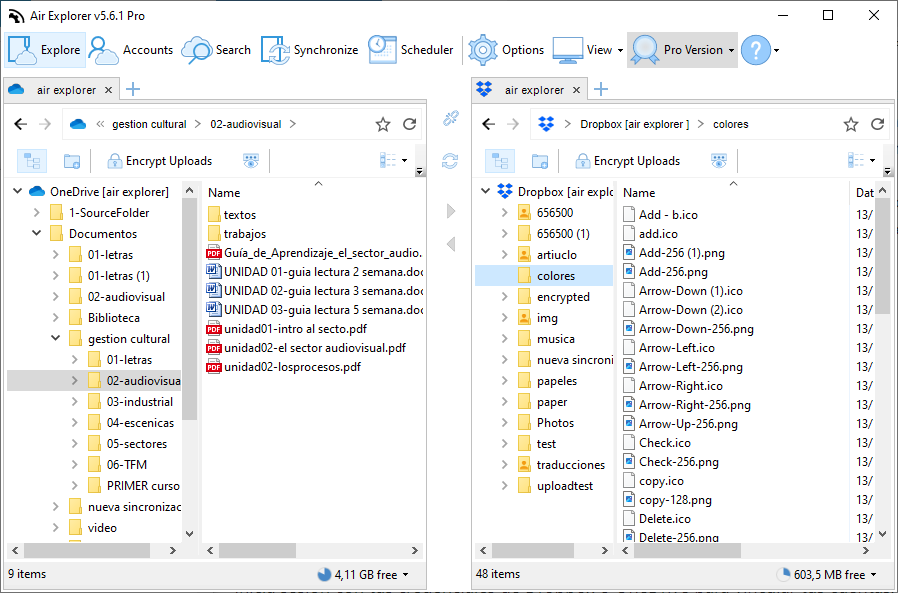
- Efficiency: You can open Google Drive in the left pane and Dropbox in the right. Moving files between them is a simple drag-and-drop. The software handles the transfer directly, saving you from the “download-then-re-upload” nightmare.
- Organization: It allows you to search across all your clouds simultaneously. No more guessing where you saved that PDF from 2023.
2. Air Live Drive: Seamless integration
For those who feel that the cloud should be invisible, Air Live Drive is the perfect solution.
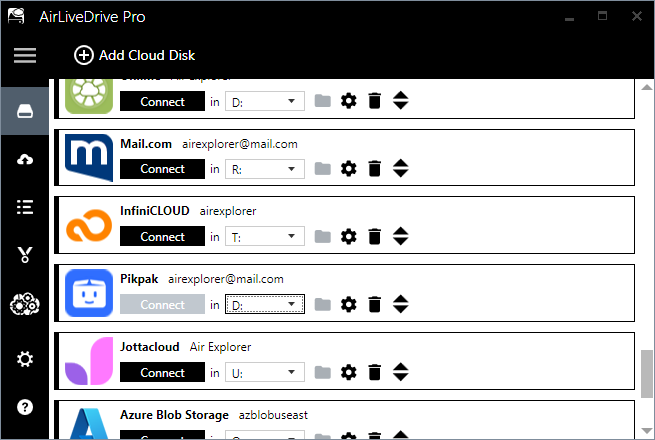
- Cloud as a local disk: This tool “mounts” your cloud accounts as if they were physical hard drives connected to your computer. Your OneDrive becomes the
D:drive, and your MEGA becomes theE:drive. - Save your SSD: Unlike official apps, Air Live Drive does not sync everything to your local disk. It only downloads the specific file you are working on.
3. Air Cluster: The power of unity
Air Cluster addresses the issue of fragmentation by doing something revolutionary: it joins multiple accounts into one.
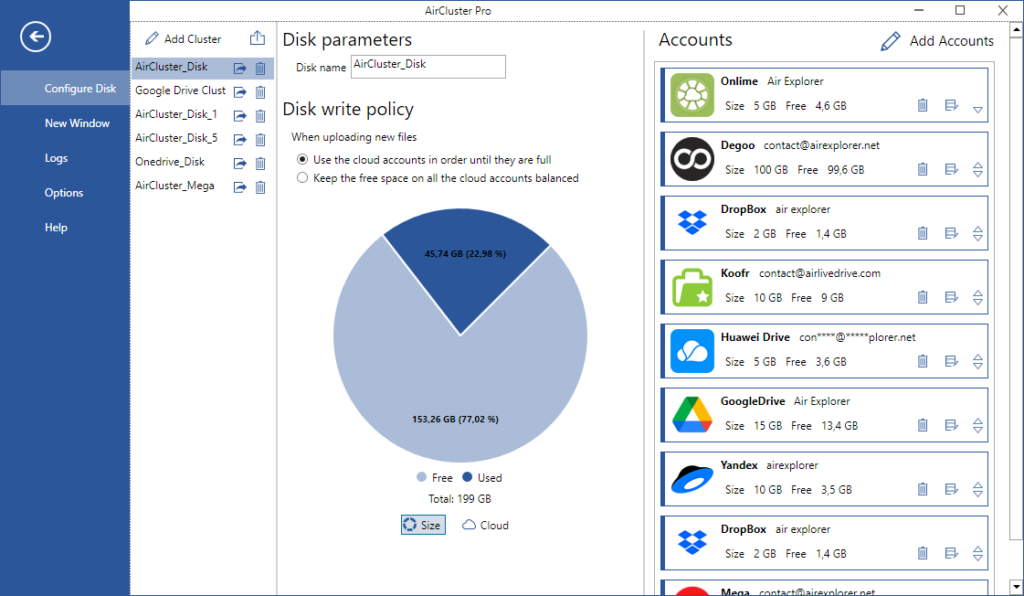
- Create a super cloud: If you have three free Google Drive accounts, Air Cluster can merge them into a single 45GB pool.
- Simplified backups: You can set up synchronization rounds between different “clusters,” ensuring that your most important data is backed up across multiple providers automatically.
Conclusion
Cloud storage is undoubtedly the most powerful tool in our modern digital arsenal, offering freedom, safety, and collaboration. However, without the right management strategy, it can quickly become a disorganized burden that consumes your time and local disk space.
The “one size fits all” approach of official cloud apps is often insufficient for the modern user who balances multiple accounts and heavy workloads. By using the specialized tools, you can regain control of your digital life. Whether you need to mount your clouds as drives, manage them through a centralized explorer, or cluster them into a giant storage pool, there is a solution designed for you.